Your users ask. Your app does it.
Ablehand is a command bar for your web app. A user types what they want, like "invite a teammate" or "export last quarter," and it gets done in their own session, in seconds, inside guardrails you set. One script tag. No tours to author, no selectors to maintain.
Built to be measured.
Numbers from the production deployment, not a slide.
< 0.5 s
per decision
Median 430 ms end to end from the browser, measured on production. Users see the next step before they'd have finished reading a tooltip.
Every release
tested on production
The full end-to-end task suite runs against the live deployment. A release ships only when every task completes.
0
credentials leave the page
No cookies, tokens, passwords, or screenshots. Card numbers, SSNs, and keys are redacted in the browser before anything is sent.
Any
stack, any language
It reads roles and labels on the live page, not your code. React, Vue, Rails, PHP, server-rendered, and whatever language your users speak.
What changes for your team.
Fewer "how do I" tickets
The questions that fill your support queue become goals the user types once and watches complete. Settings, billing, invites, exports, cancellations.
Faster time to value
New users don't hunt for the feature; they ask for it. Onboarding steps happen in the product, in their session, without a tour you have to maintain.
You learn what users wanted and didn't get
Every goal is counted. The Needs page and a Monday digest show what people asked for, what resolved, where they got stuck, and the first fix to try.
No authored tours. It reasons over the live page.
A fast structured-decision model reads what's actually on screen and chooses one observed element per step, so it adapts when your UI changes and covers tasks nobody scripted.
Snapshot
The widget indexes the visible, interactive controls on the current page: labels and roles, never selectors or code.
Decide
The edge asks the model for one choice: which observed control, and what to do. Click, type, select, or navigate.
Act
The widget re-validates that choice against the live DOM and performs it in the user's session, then repeats until the goal is met.
Guide, or Do. You set the line.
Default to showing users the way; let them opt into hands-free. Irreversible steps ask first.
Guide
Highlights each step and narrates it; the user performs it. Zero-risk onboarding and accessibility.
Do
Completes the task for the user ("cancel my plan", "export last quarter's invoices"), confirming consequential actions.
Hybrid
Does the reversible steps, guides or confirms the ones that matter. Your capability gates bound what's possible.
Safe by construction.
Same-origin, in-session, loaded by a tag you control. The security model is the architecture, not a policy.
It can only do what your user can
Runs in their own browser session with no elevated credentials, and nothing leaves the page except a decision request.
The model never emits a selector or URL
It returns an index into controls the widget already observed and re-validates, so a wrong answer can't point it somewhere arbitrary.
Secrets stay in the browser
Password, payment, and hidden fields are excluded; cards, SSNs, tokens, and keys are redacted before any snapshot is sent.
You hold the guardrails
Per-site capability gates, deny lists, confirmation policy, and operator hints, edited in the console without shipping code.
Full detail in Security & trust model and Trust & data handling, including the subprocessor list and retention policy.
One line to deploy.
Add the tag, register your origins, and the same widget running on this page runs on your app. Fifteen minutes, start to finish.
<script src="https://ablehand.ai/nav.0.x.js"
        data-site-key="pk_your_key"
        data-mode="guide" defer></script>
Why not a product tour or a server agent?
| Scripted tours (WalkMe, Pendo) | Server agents (browser-use, Operator) | Ablehand | |
|---|---|---|---|
| Authoring | Hand-built flows per task | Prompts + a hosted browser | None. Reads the live page |
| Survives a UI change | Breaks every release | Varies | Adapts |
| Where it runs | Overlay on your page | A browser farm you run | The user's own session |
| Credentials | N/A (only points) | Needs the user's, or a hosted login | Never leave the browser |
| Completes the task | No, only shows | Yes, off-site | Yes, in-session |
Early access.
We're onboarding a limited number of teams this quarter, one at a time, with hands-on setup. Free for the first 30 days, then $199 a month, locked for a year for teams that start before January.
Week 1
A 20-minute call to pick three to five target tasks and the metric you care about. You paste the tag on staging; we check the first runs together.
Weeks 2 to 4
Guide mode live for a cohort of your users. Monday digest of what they asked for. Misses get fixed on our side, usually the same week.
Day 30
You see your numbers: goals, resolved rate, the top unmet needs. If it earned its keep, you keep it at $199 a month. If not, remove the tag and nothing to unwind.
See it drive a real app.
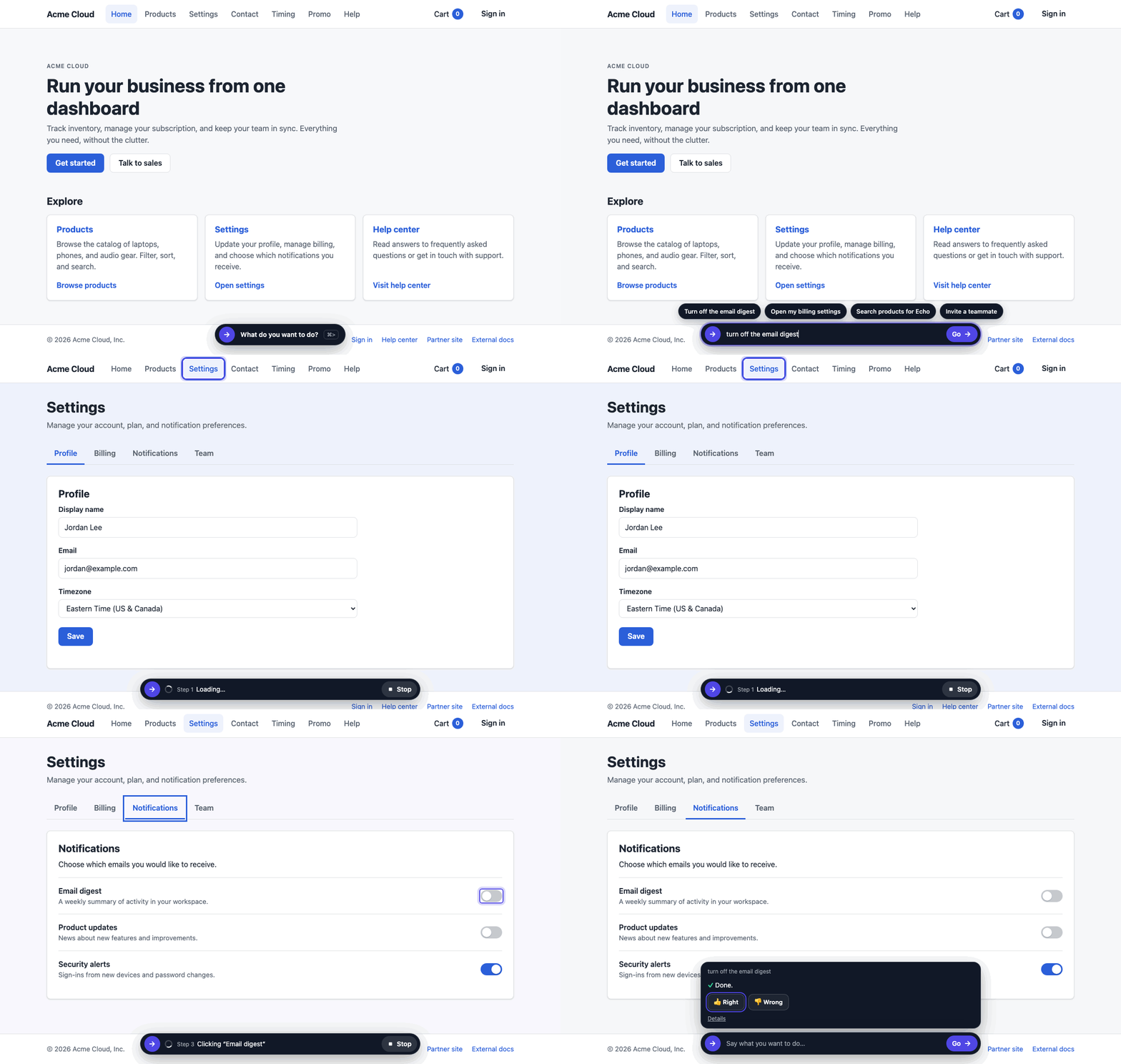
The demo is a working SaaS workspace. Open the bar at the bottom of the page and try "turn off the email digest", "open my billing settings", or "search products for Echo". Or use the bar on this page to go there.
Open the live demo →Who builds this.
Ablehand is made by zob.llc, a US software company. It's a small team, led by Zack, and the person who answers hello@ablehand.ai is the person who ships the fixes. The widget runs on this site and on our own stores and publications before it runs on yours. Progress is public in the changelog.